
To assist a health care professional who has not received their welcome email from Vertigenius, please follow these steps:
- Email Search: Instruct the clinician to check their email inbox for any messages from admin@vertigenius.com. This is the address from which all clinician welcome emails, including login details, are sent.
- Spam/Junk Folder: If no email is found in the inbox, advise them to look in their Spam or Junk Mail folder, as sometimes emails may be incorrectly filtered there.
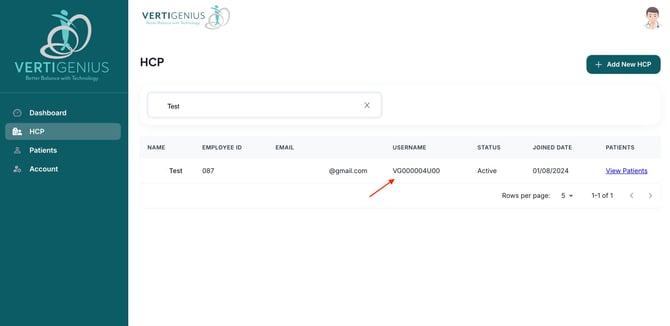
- Forgot Password Option: If the welcome email is still missing, they can use their unique Health Care Professional (HCP) username, which is a specific number found in the HCP tab. Direct them to the login screen and select the "Forgot Password" option. This will trigger an email from admin@vertigenius.com with instructions on how to reset their password and gain access to their account.
By following these steps, the clinician should be able to retrieve their login information and access the Vertigenius platform successfully.