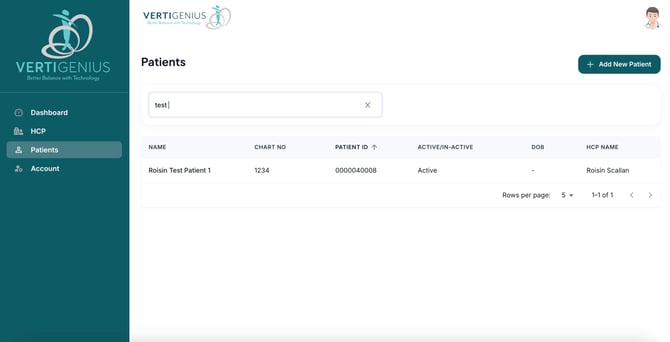
To locate a patient using the search function in the list of patients, follow these steps:
- Log In: Ensure you are logged into your account.
- Access the Patients Tab: Navigate to the "Patients" tab located in the left-hand navigation bar.
- Utilize the Search Bar: In the search bar at the top of the patient list, enter the patient's name. As you type, the system will dynamically display entries that match your input.
- Review Search Results: The results will appear below the search bar, showcasing all patients whose names correspond to your query. If necessary, refine your search by including additional details such as age or other identifying information to narrow down the results.
- Select a Patient: Click on the desired patient's name from the list to view their detailed information.
By following these steps, you can efficiently find a patient within the system. If you have further questions or need assistance with advanced search options, please refer to our detailed help section or contact support.