
To add a health care professional (HCP) to your clinic using the Vertigenius Clinician Portal, follow these steps:
- Log In: Access the Vertigenius Clinician Portal with your credentials.
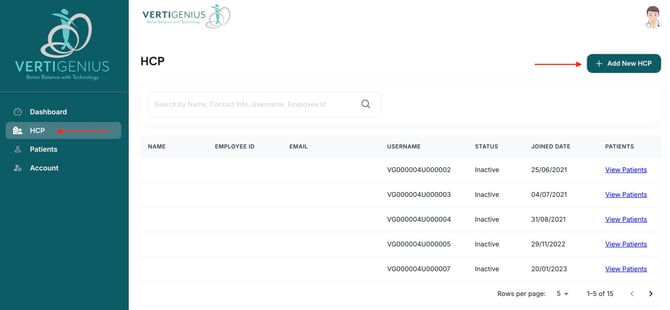
- Navigate to HCP Tab: Once logged in, locate the HCP Tab in the left navigation menu.
- Add New HCP: Click on the "Add New HCP" button to initiate the process.
- Fill in Required Details: Complete all necessary fields in the provided form. Ensure that all information is accurate and up-to-date.
- Submit Information: After entering the details, click on the "Add" button located at the bottom right of the screen to finalize the addition.
By following these steps, you can efficiently integrate a new health care professional into your clinic's system, enhancing your team's capability to provide comprehensive patient care. If you encounter any issues during this process, please consult our support resources or contact customer service for assistance.
.jpeg?width=670&height=303&name=Image%2022-10-2024%20at%2012.58%20(1).jpeg)